Introduction to Links
Summary
Section titled “Summary”Links are an important element in all digital content. Links allow people to navigate between one web page, document, or file and another. People should be able to find links easily and understand where they go. Creating links that are descriptive, unique, and stand out from the surrounding text helps everyone to navigate content and complete tasks involving links easily.
Overview
Section titled “Overview”Accessible links, or hyperlinks, provide a key functionality in websites and documents and, for that reason, are a critical component of accessibility. They connect a web page or document to another location or file. Text, images, icons, and other elements can all be links.
It is important that links work for everyone. Links can present challenges for some groups of people with disabilities if they are not built with accessibility in mind:
- People who are blind.
- People who have limited or low vision.
- People with cognitive and learning disabilities.
- People with limited or no manual dexterity.
- People who are color blind.
To meet the needs of these diverse groups of people it is important to ensure that links are visually distinguishable, link text is descriptive, and redundant links are avoided. In other words, links need to be easy to find, easy to understand, and unique. These basic guidelines make links easier to use, prevent confusion, and decrease the cognitive load for everyone. Links are not something people should have to stop and think about - using a link should be effortless.
Who is Helped
Section titled “Who is Helped”People Who are Blind or Have Limited or Low Vision
Section titled “People Who are Blind or Have Limited or Low Vision”These individuals typically rely on assistive technologies such as screen readers to access online information. They can use the screen reader to generate a list of links and quickly access any link on a page. They can also access links by tabbing from one link to another as the screen reader announces each link.
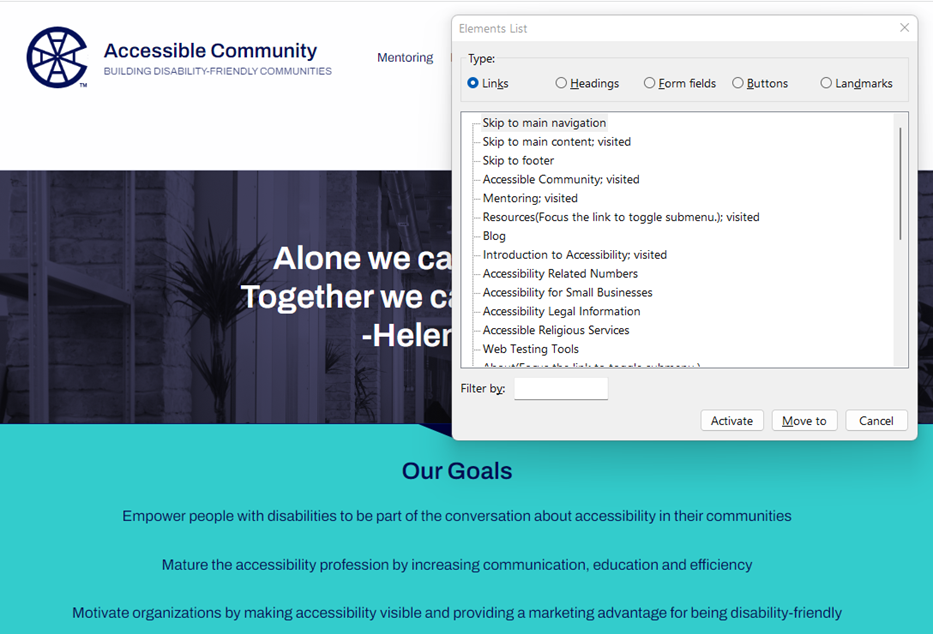
Figure 1 shows the list of links generated by an NVDA screen reader for the Accessible Community Home Page. The list includes links like ‘Skip to main navigation’, ‘Mentoring’, and ‘Blog’. Even taken out of context, these links make sense - it’s easy to understand what will happen if any of these links is selected.
- Screen reader users rely on descriptive text to determine the meaning of links. Since these users often navigate by getting a list of links it is important for links to make sense when taken out of context.
- Having many links on a page that go to the same destination can be confusing. This is especially true when adjacent links go to the same destination or when links with different link text go to the same destination.
- People with limited or low vision also need links that are visually distinct from the adjacent static text. Without this visual cue, links can be hard to find and may be missed completely.
People with Cognitive and Learning Disabilities
Section titled “People with Cognitive and Learning Disabilities”Links that are ambiguous, redundant, or hard to identify can increase the cognitive load for people with cognitive and learning disabilities.
- Vague or ambiguous links may be hard to understand. People with cognitive disabilities and learning limitations rely on descriptive text to provide meaning to links.
- Every link encountered increases the number of decisions a person has to make. Redundant links cause the purpose of links to become unclear, distract a user’s attention, and cause confusion. This reduces the ability of individuals to navigate or interact with content successfully. Moreover, people may fail to recognize that they have already selected a link which can increase their confusion.
- Links that are not visually distinct from adjacent static text are hard to find and may be missed completely.
People With Limited or No Manual Dexterity
Section titled “People With Limited or No Manual Dexterity”For people with physical disabilities that prevent them from using a mouse, redundant links increase the number of keystrokes required to tab to all the links on a page. These extra keystrokes may slow them down, cause discomfort, and make it difficult to navigate a site.
People Who are Color Blind
Section titled “People Who are Color Blind”These individuals cannot always distinguish links from the surrounding text when color is the only indicator used to identify links. Underlined links are the best way to support people who are color blind.