Page Purpose
Summary
Section titled “Summary”A page with a clear purpose tells people they are in the right place, even if they are distracted for a moment. If a person is distracted and then returns to the page, they may not remember what they were doing.
- A descriptive heading, title, or short statement at the top of the page explains what the page is about and makes its purpose clear. A summary or abstract makes that purpose clear for longer pages of content.
- Additional wayfinding cues, such as breadcrumb navigation on a website or headers and footers in a document, help people understand how they got to the page and what the context of the page is within the website or document.
Without cues like these, it can be easy for people to lose track of where they are.
Overview
Section titled “Overview”A clear purpose helps people understand the page they are on, the purpose of a page, the content, and the context of the page within the site or document. It provides information about the context of a page and its components. A clear purpose should allow people to find answers to the questions in the following table.
| User Concerns | Solutions |
|---|---|
|
Tell me where I am:
|
Page title, Page heading, Current page indicators, Progress indicators These solutions validate that the person is in the right place and help them decide whether to continue there or go to another place. |
|
Tell me what is on this page:
|
Page Title, Headings, Summary Statement, Summary, Abstract These solutions help a person find the information they are looking for, decide whether or not to consult the information, and avoid spending time on information that is irrelevant. |
|
Tell me where else I can go:
|
Menu (web), Table of Contents (document) These solutions help people decide whether to consult other information on the site or document. Clear titles and headings help make this decision easy. |
Making the purpose clear provides the information people need to orient themselves within the site or document, know where they are and where they can go, what information they can consult, and what actions they can take. In conclusion, it means they can navigate through a page, website, or document without getting lost or confused.
The objective is to implement different techniques associated with the organization and structure of the website or document, as well as others that allow providing more information about the purpose of its components to reduce the cognitive load and the time generated by the search for information and the performance of actions on the website.
Who is Helped
Section titled “Who is Helped”Clear identification of purpose helps:
- People with memory impairment and or lack of attention related to age or attention deficit hyperactivity disorder (ADHD)
- Clear identification of purpose helps to ensure these individuals do not feel lost if they lose focus on the information they are consulting.
- People with cognitive disabilities related to executive functions and decision-making
- Clearly defining the purpose of an action makes it easier for these individuals to make an appropriate decision and decide whether or not to carry out that action.
- People with motor disabilities
- By clearly defining the purpose of a section of content, these individuals can decide to skip over it if they consider it irrelevant, thereby avoiding unnecessary keystrokes.
- People with visual disabilities
- These individuals can determine the purpose of a section of content, for example, by looking at the headings.
- People whose native language is different from that of the website
- These individuals are better able to understand information when the purpose is clearly defined.
- Older people who are not familiar with technology and navigate the Internet, especially if the website is large,
- These individuals are better able to recognize sections of a document or website and how to interact with the components when the purpose is clearly defined.
Guidelines
Section titled “Guidelines”It is a best practice, based on W3C guidelines from “Making Content Usable for People with Cognitive and Learning Disabilities,” that the purpose of a web page and its context with the website is clearly defined.
The main techniques for this include providing a title, summary, and headings for the pages of a website. This ensures a greater understanding of their purpose, allowing people to avoid accessing the rest of the content if they do not consider it relevant and saving time. A summary is only needed for long web pages. A descriptive page heading is enough for a shorter page. It is also important to provide wayfinding cues like breadcrumbs and current page indicators. These signposts tell people where they are within the site and how they got there.
Figure 1 below shows some of the page titles found on the Accessible Community website to identify each of the site’s pages. The title format is “page name l website name.” For example: “Volunteer l Accessible Community” indicates that the person is on the Volunteer page of the Accessible Community website. The page title is usually the same as the main heading for a web page.

See Page Titles for more information on using these methods.
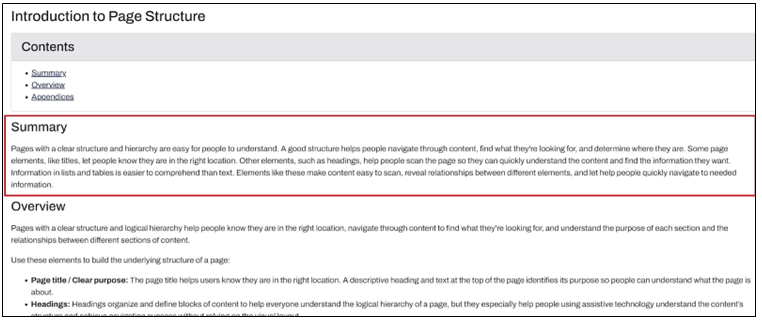
Figure 2 below shows a summary found at the beginning of an article on the Ta11y website to clarify the purpose of the article. Only use a Summary for long pages; they are unnecessary on short pages with a descriptive heading.
See Provide a Summary for information on using these methods.
Headings are associated with the organization and structure of a web page. They help to clarify the context in which the person is located within the web page. This helps to reduce the cognitive load generated by searching for the information, especially if the page is complex.
Different headings can be used to group content for a better understanding and search of page content. Provide a main heading with the general idea of the overall page content and subheadings to describe different sections of the page.
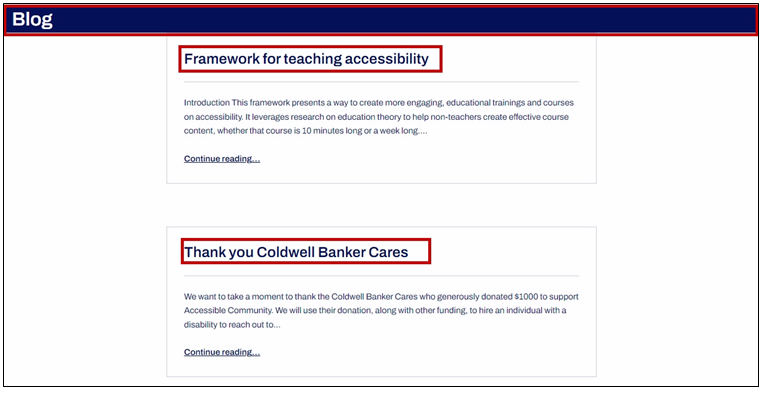
Figure 3 below shows the headings found on the blog page of the Accessible Community website to identify each blog article.
See Headings for information on using this technique.
Techniques
Section titled “Techniques”Follow these basic techniques for each of the guidelines.
- Provide clear identification of the page’s purpose and context:
- Make sure each page’s title and main heading identify its purpose so that people quickly understand what the page is about and can find the information they need. Use wayfinding cues to provide context.
- For long pages, include a summary at the top to help people decide if the page contains the information they need.
- To learn more about why a clear purpose is important, see Make the Purpose of Your Page Clear (W3C).
- Provide clear identification of the purpose of the page sections:
- Provide headings that clearly indicate the structure and purpose of each section of content.
- To learn more about why heading structure is important, see Make the Site Hierarchy Easy to Understand and Navigate (W3C)
- Use clear and concise language:
- Make sure all content is described using short, descriptive headings. If headings are confusing or ambiguous and do not clearly describe the content, this can create a barrier to understanding its purpose.
- To learn more about why clear language is important, see Use clear and understandable content -(W3C).
- Use wayfinding techniques to provide context:
- Use techniques such as breadcrumbs, current page indicators, etc., to indicate where the person is within the site.
- To learn more about why context is important, see Make the Purpose of Your Page Clear (W3C).
How to Test
Section titled “How to Test”There are many criteria to consider when checking for a clear purpose.
- Use a visual inspection to check the headings, and summary, if applicable, to ensure they are concise, descriptive, and easy to understand.
- Use a visual inspection to check the page title in the browser tab. Ensure the page title and the main heading are the same or very similar.
- An accessibility test tool like WAVE, ANDI, or the ARC Toolkit can also be used to quickly check the page title and headings.
- For more information on each of these test methods see:
- Ensure techniques such as breadcrumbs, current page indicators, etc., are provided that indicate where the person is within the site.
- See Multiple Ways to Navigate (Ta11y) for more information on implementing and testing navigational techniques that reinforce location and orientation cues.