Check Spelling and Grammar
Check Spelling & Grammar
Section titled “Check Spelling & Grammar”Summary
Section titled “Summary”Correct spelling and grammar ensure your content is easy to read. Poor spelling and grammar can lead to misunderstandings. For some people, these can be significant.
Errors in spelling and grammar can be confusing for:
- People with cognitive and learning disabilities.
- People with language barriers.
- People using assistive technology, such as screen readers.
Well-written content helps all readers understand your message.
Overview
Section titled “Overview”It is all too easy to misspell a word or have a typo or two in the content. Even though automated tools are helpful, it is still possible to end up with a misspelled word or incorrectly worded phrase in a document.
Correct spelling and grammar aid in the clarity and readability of written content. In particular, well-written content helps:
- People with cognitive and learning disabilities like dyslexia can have increased difficulty understanding content with spelling and grammar errors.
- People using assistive technology, such as screen readers, are slowed down if they have to stop and listen to words letter by letter to understand what they hear.
- Individuals who have difficulty reading or are non-native speakers can have a hard time understanding content with spelling and grammar errors.
- Content with correct spelling and grammar also conveys professionalism and trustworthiness.
Taking the time to check written content with a good spelling and grammar checker helps everyone understand the content with less confusion.
Who is Helped
Section titled “Who is Helped”People with cognitive disabilities that impact language skills, memory, or focus benefit from good spelling and grammar:
- It can be difficult for people with limited language skills to understand content with spelling and grammatical errors.
- People with cognitive disabilities that impact memory or focus can experience frustration and anxiety when content has spelling and grammatical errors. When these individuals fail to comprehend what they read, they may assume that the problem is their inability to understand the material.
- Spelling and grammatical errors can make it harder for people with cognitive and learning disabilities that impact reading, such as dyslexia.
People who rely on screen readers or other types of text-to-speech software may be delayed if they have to stop and listen to words letter-by-letter to understand what they are hearing.
Non-native speakers may struggle to comprehend content with spelling and grammar errors, as second languages are usually taught with a focus on correct grammar.
People with low literacy skills or other language barriers also find reading and comprehension more difficult when the content contains spelling and grammar errors.
Good spelling and grammar improve readability and enhance comprehension for everyone.
Guidelines
Section titled “Guidelines”Use Built-In Spelling & Grammar Checkers
Section titled “Use Built-In Spelling & Grammar Checkers”If your writing application comes with a built-in spelling and grammar checker, keep it turned on as you write and do a final check when you’re done writing.
- MS Word, Google Docs, and other word editing software include spell-checking and basic grammar-checking tools in a number of languages.
- WordPress and other website creation tools also include plugins that will check your spelling.
Use an External Editing Tool
Section titled “Use an External Editing Tool”There are many editing tools on the internet that do a better job of checking spelling and grammar than the tools that come with writing applications. Many of these are free. These more advanced tools catch more grammatical errors and provide greater insights about how to correct errors. Add one of these tools to your writing toolkit and use it.
These are a few of the many available grammar editing tools for writing in English:
Examples of Editing Tools
Section titled “Examples of Editing Tools”Grammarly and Hemingway are two examples of editing tools you can use.
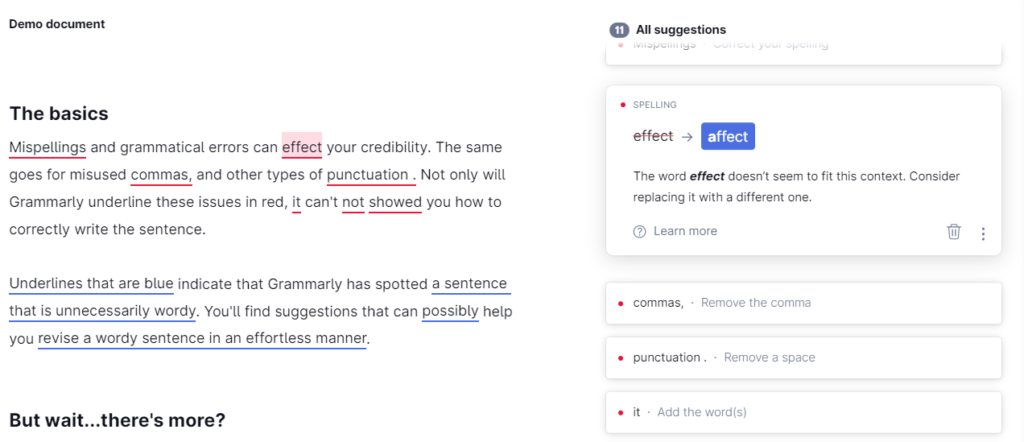
Figure 1 is a screenshot of Grammarly’s demo page with spelling, grammar, and punctuation errors identified. The highlighted error identifies the incorrect use of the word “effect” in the sentence, “Mispellings and grammatical errors can effect your credibility.” Grammarly then suggests that the word “affect” seems to be a better fit within the context of this sentence. It makes similar suggestions to correct each of the identified errors.
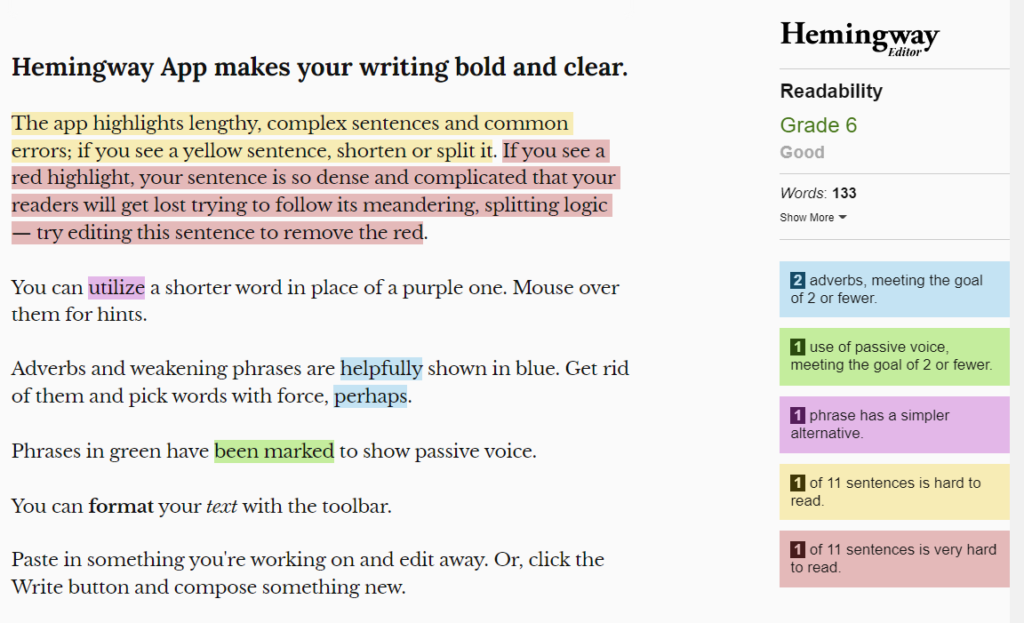
Figure 2 is a screenshot of Hemingway’s demo page with spelling, grammar, and punctuation errors identified. The highlighted errors identify two long sentences. Hemingway suggests that these sentences are either hard to read or very hard to read. It makes similar suggestions to correct each of the identified errors.
Use One Country’s Standard Consistently
Section titled “Use One Country’s Standard Consistently”If you are writing in a language that is used in multiple countries, such as English, French, Spanish, or Portuguese, use one country’s rules for grammar and spelling consistently in a document. Using different spelling or grammar within the same document can be confusing for people with cognitive disabilities, and may not be read consistently for people who use screen readers.
Finish With a Manual Review
Section titled “Finish With a Manual Review”Automated spelling and grammar checkers are not perfect. They can miss nuances that are important for a specific context. This is especially true when information is highly technical or related to a particular profession. You, as the author, need to decide if a certain word or phrase is the correct one to help your audience understand your information.
- Start by taking a critical look at your content.
- Try to look at your content from your audience’s point of view.
- Focus on context-based errors that are not always caught by automated tools.